
Find the gaps in your Commander deck
A deck can have a clear theme and still struggle to get going. Import your list into Commandarium and review its role counts against their targets. Use them to ask better questions about your mana, card draw, and answers before choosing your next upgrade.
Opens Commandarium. Tap Decks, then Import deck, and paste your list.
Start with the problem you notice in games
Your spells stay in your hand
Review the land count, mana requirements, and early acceleration. Adding another expensive threat may not address the reason you fall behind.
You run out of things to do
Look at your card draw. Consider when it becomes available and whether it depends on a board state you cannot reliably maintain.
One opposing card stops your plan
Review your interaction. Think about which threats your answers can handle and whether you can cast those answers when needed.
Use role counts as a starting point
On the Analysis tab, Commandarium counts the deck’s ramp, card draw, removal, board wipes, creatures and Game Changers, next to its land count, mana curve and colors. Each card is counted once, under its main role.
Each count stands next to its target: Card draw 2/9 means seven short, and a role below its target is marked and listed in the rules report under Show details. The targets follow the strategy Commandarium reads from your commander — tokens for Krenko — with the creature target taken from the average EDHREC deck for that commander. The Commander deck ratios guide explains the starting ranges.
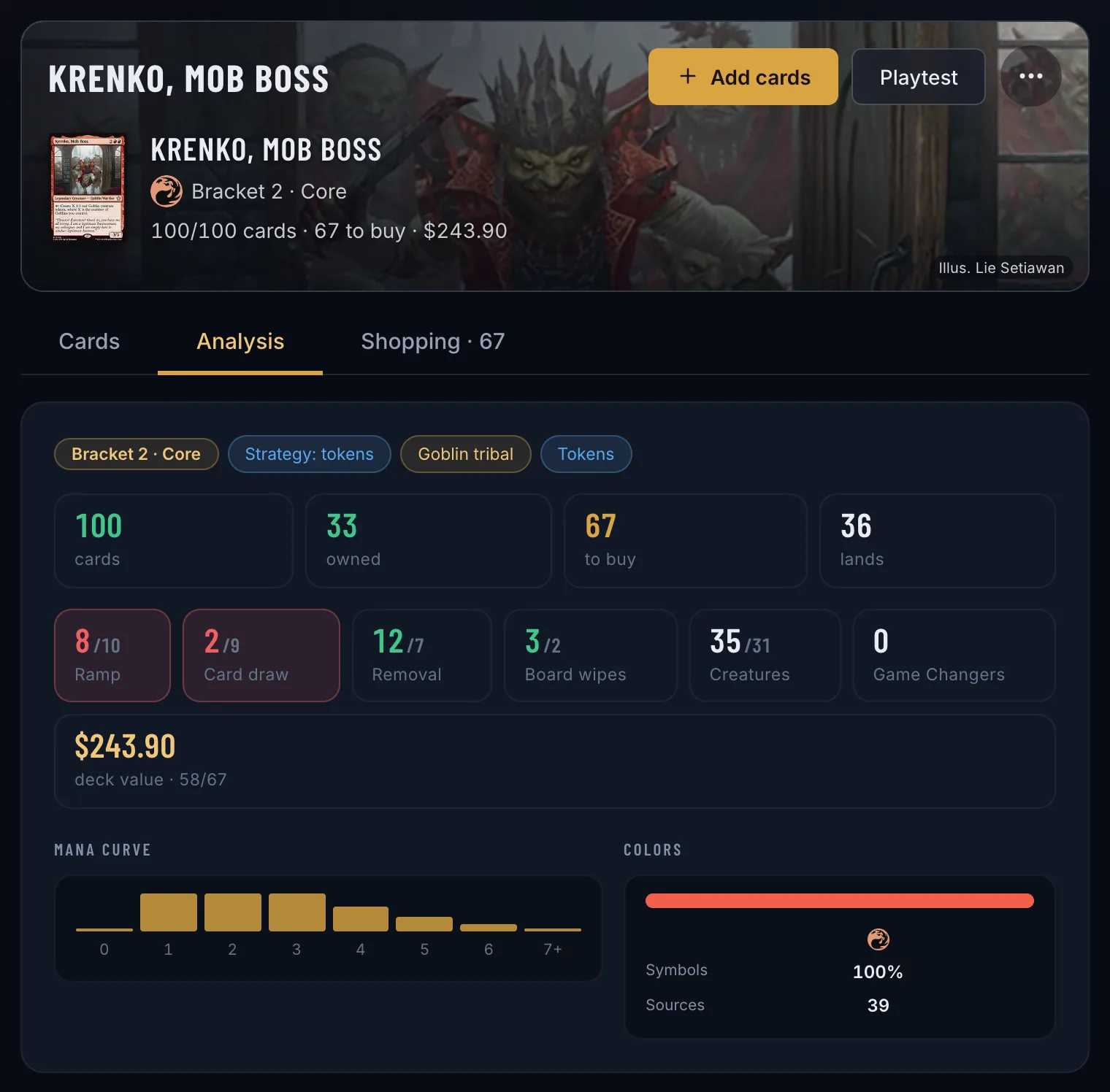
Use those counts to decide where to investigate. Then read the individual cards: an expensive draw spell and a cheap draw engine can fill the same broad role while playing very differently.
Review your list in three steps
- Import your existing decklist. Under Decks → Import deck, paste the list or open a CSV.
- Inspect the role counts, then the cards. The counts and their targets are on the Analysis tab; the cards themselves, grouped by type, on the Cards tab.
- Make a focused change and test the deck again. Playtest draws sample opening hands, so you can try the change before your next game.
Keep notes on what happened in actual games. A useful revision addresses a recurring problem you observed.
The Analysis tab also checks the basic rules — 100 cards, singleton, color identity — and counts Game Changers for the deck’s bracket. For the next upgrade, see how to upgrade a Commander deck on a budget.
Check your own list
Free, in your browser — importing a list needs no collection and no account.
Take a closer look at my deckOpens Commandarium. Tap Decks, then Import deck, and paste your list.
Questions
Is there one correct ratio for every Commander deck?
No. Strategy, mana curve, commander abilities, and your playgroup affect what the deck needs.
Do good ratios guarantee a strong deck?
No. Counts do not fully describe synergy, efficiency, or how a deck plays.
Where can I understand the targets?
Read the Commander deck ratios guide for the starting ranges and strategy-specific explanations used by Commandarium.
Read more
More ways to build from what you own
ManaBox collection to Commander deck
Already catalogued your cards in ManaBox? Import the CSV and build around what you own.
How it works →Delver Lens CSV to Commander deck
Scanned your cards with Delver Lens? Import the CSV and build a Commander deck from your scans.
How it works →MTG spreadsheet to Commander deck
Keep your cards in Excel or Google Sheets? Save the list as CSV and build from it.
How it works →Scan cards and start a deck
No digital collection yet? Scan a small stack and start building from it.
How it works →Choose a commander from your collection
Your next commander may already be in your binders. Explore the legendary creatures you own.
How it works →A deck from one binder or box
Turn one binder, one box or one pile of bulk into a complete Commander deck.
How it works →Upgrade a precon with your cards
Make a preconstructed deck stronger with the cards already sitting in your binders.
How it works →A shopping list from your collection
Only the cards your collection is missing for a deck — with today’s prices and the total.
How it works →Deck prices on Cardmarket
What a Commander deck costs in euros — and what it costs you after the cards you own.
How it works →