
Your next commander might already be in your collection
Before choosing another deck to buy, take a look at the cards you have. Bring your collection into Commandarium and explore your legendary creatures as starting points for a new Commander deck.
Opens Commandarium. Tap New deck on the start screen to see the possible commanders in your collection.
Start with a play style you enjoy
An interesting commander gives you a reason to build. The cards around it make that idea work.
Do you enjoy creating tokens, bringing creatures back from the graveyard, or casting a string of spells? Look for a commander whose plan appeals to you, then consider how your existing cards support it.
Ask three questions before committing
Do I want to play this strategy?
Read the commander’s abilities and imagine a typical turn. Choose a plan you would enjoy repeating across several games.
What support do I already have?
Look beyond cards that mention the same theme. Mana acceleration, card draw, and interaction also help turn an idea into a functioning deck. How much of each
What would I need to add?
A promising first draft can still need extra cards. Review the missing pieces before deciding how much more to invest.
Build a draft and learn from it
Choose a commander in Commandarium and generate a starting list.
Review which cards come from your collection, where additions are suggested, and whether the resulting strategy feels like something you want to play. You can revise the draft or try another commander.
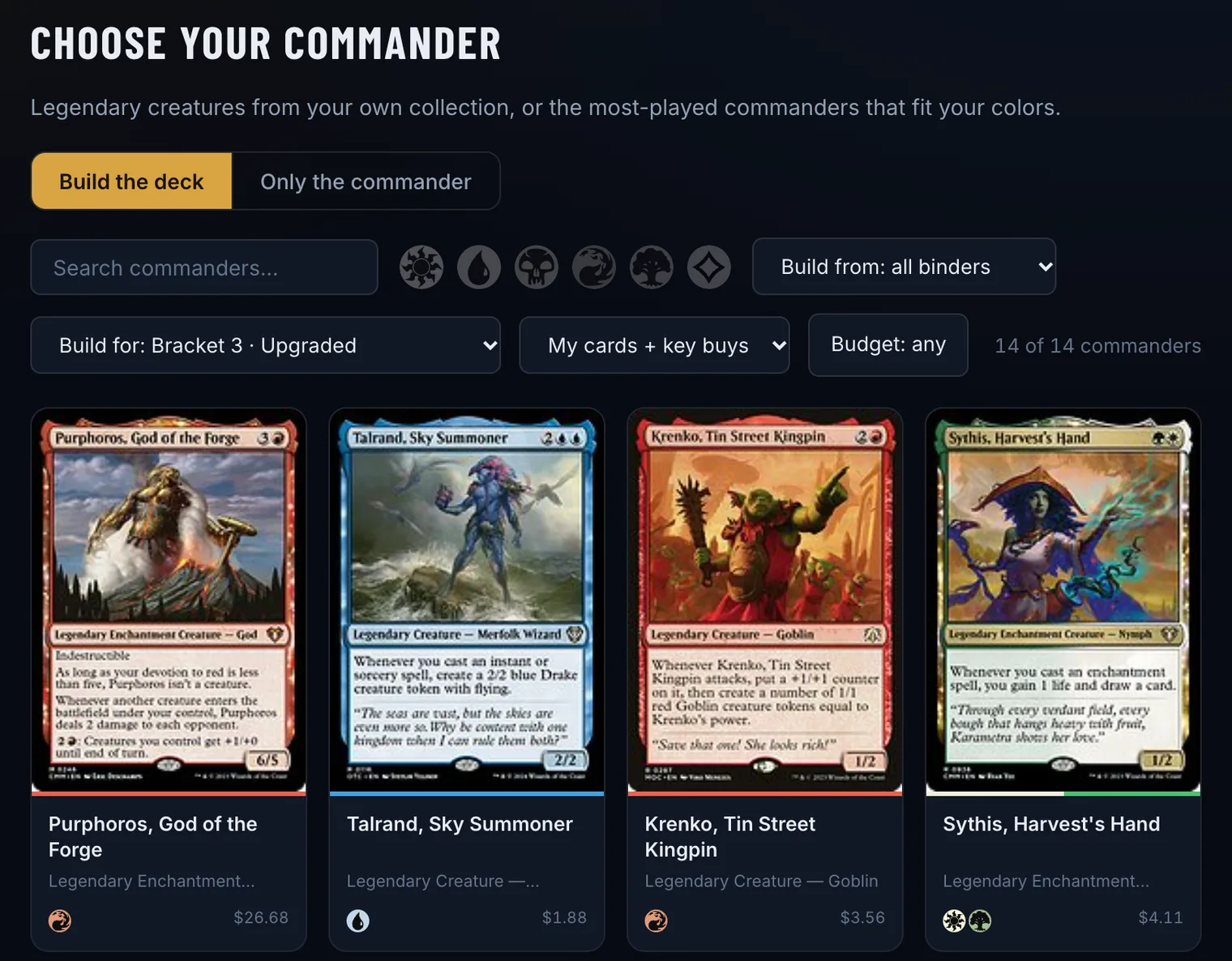
- New deck lists every possible commander in your collection. Search by name or filter by color.
- Build from keeps the draft to one binder if you like, and My cards first uses your own cards wherever they can fill a slot.
- In the finished deck, the Analysis tab names the strategy and themes Commandarium sees, and the Shopping tab lists what the draft would still need.
- Not convinced? ··· → Change commander tries another one, and Only the commander starts a deck you fill yourself.
See which commanders you own
Free, in your browser. No collection in Commandarium yet? Import it or scan a stack first.
Find a starting point in my collectionOpens Commandarium. Tap New deck on the start screen to see the possible commanders in your collection.
Questions
Do I need a complete deck before starting?
No. Exploring a commander can help you see what your collection is missing.
Can I choose a commander I do not own?
Yes. The builder also lets you start with a commander outside your collection: search for the card, open it and tap Build a deck around it. The commander then heads the shopping list.
Should I choose the commander that needs the fewest purchases?
That is one useful consideration. Enjoying the deck’s play style matters too. Commandarium does not rank commanders by cost — each draft shows its own count of cards to buy.
Read more
More ways to build from what you own
ManaBox collection to Commander deck
Already catalogued your cards in ManaBox? Import the CSV and build around what you own.
How it works →Delver Lens CSV to Commander deck
Scanned your cards with Delver Lens? Import the CSV and build a Commander deck from your scans.
How it works →MTG spreadsheet to Commander deck
Keep your cards in Excel or Google Sheets? Save the list as CSV and build from it.
How it works →Scan cards and start a deck
No digital collection yet? Scan a small stack and start building from it.
How it works →A deck from one binder or box
Turn one binder, one box or one pile of bulk into a complete Commander deck.
How it works →Upgrade a precon with your cards
Make a preconstructed deck stronger with the cards already sitting in your binders.
How it works →Check your deck’s ratios
Import a decklist and see its ramp, card draw and removal against their targets.
How it works →A shopping list from your collection
Only the cards your collection is missing for a deck — with today’s prices and the total.
How it works →Deck prices on Cardmarket
What a Commander deck costs in euros — and what it costs you after the cards you own.
How it works →